Get paid on time, without the awkward chasing.
Payment Chaser sends polite reminders from your own Gmail, gives every invoice a simple page to pay from, and shows you exactly how much is overdue and how much has come in since it started. I set it up for you. It runs inside your own Google account.
How it works
Your invoices go into one sheet
Type them in, or import a file from Excel, QuickBooks, Xero, Zoho or Tally. I do the first import with you.
Reminders go out on schedule
Three days before the due date, on the day, then at 3, 7, 14 and 30 days after. Friendly first, firmer later, always polite. They stop the moment you mark an invoice paid.
You see what is owed and what came in
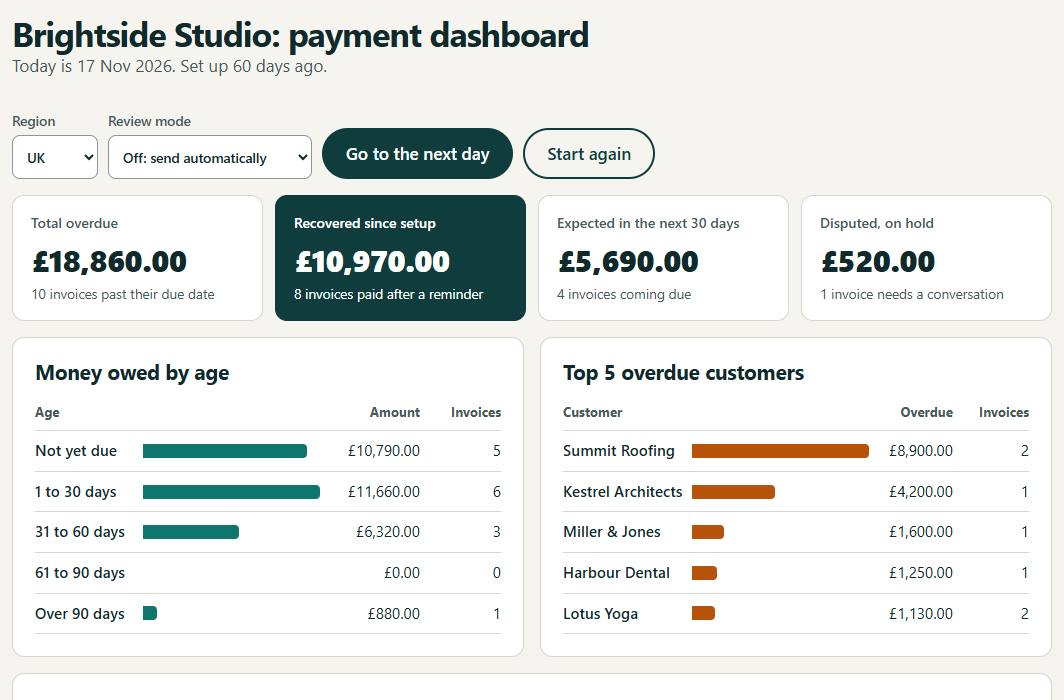
A dashboard shows overdue money by age, who owes the most, and how much has been paid after a reminder. A short summary arrives every Monday.
See it before you decide
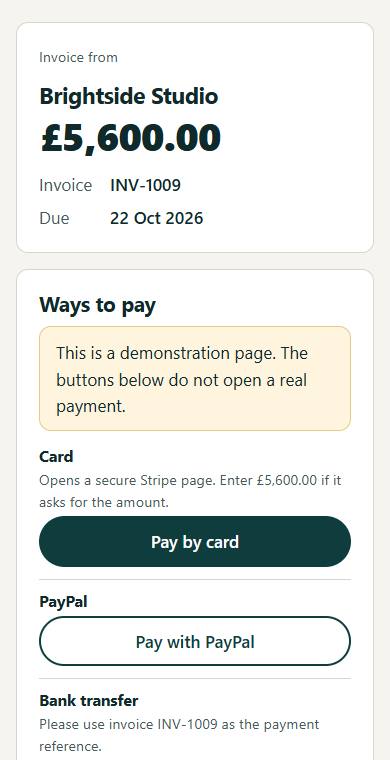
These pictures are from the demo, which uses a made-up business. Open the demo and click around; no Google account needed.
Built for owners, not accountants
You stay in control
To begin with, every reminder waits in your Gmail drafts for you to check and send. Switch to automatic sending when you are comfortable.
It sounds like you
Reminders come from your own email address, in wording you can edit. No threats, no late-fee demands, no robots.
Your data stays yours
Everything lives in your own Google Sheet and Gmail. There is no separate app to log in to and no monthly software bill.
Customers can pay easily
Each reminder links to a page with your own payment options: card or PayPal links, UPI in India, or bank transfer details.
Works where you are
Set for the US, UK, Europe or India: the right currency, date style and wording for your customers.
Someone to call
I install it, import your invoices, and stay available for changes and questions afterwards.
Want this for your business?
Tell me roughly how many invoices you send each month and what you use to create them. I will reply with how the setup would work for you.